Compendium

BitCraft Online
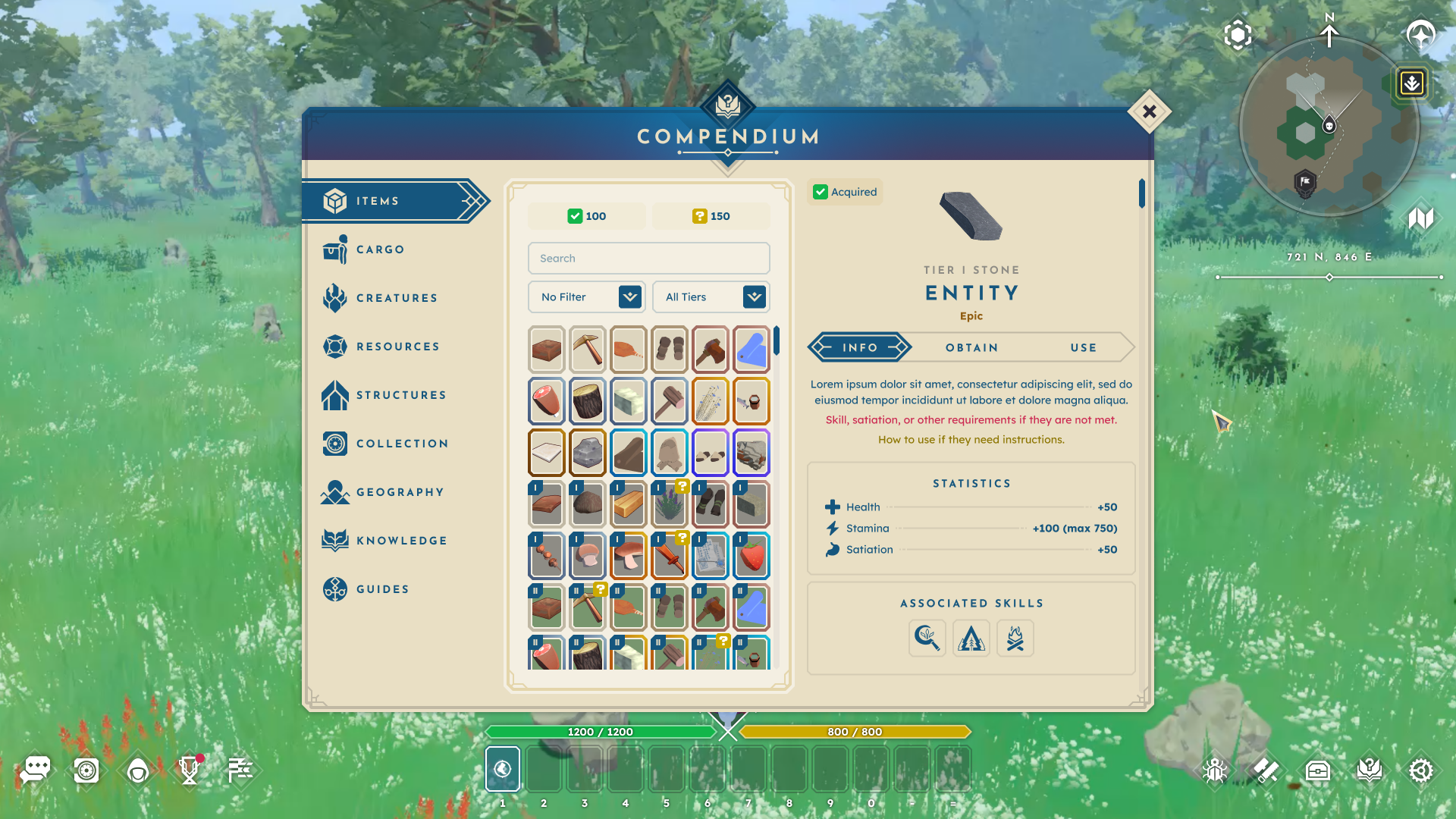
A photo of BitCraft Online's compendium.

PROJECT

The Compendium

The Compendium is an in-game, authoritative index for all player-facing details about game objects, features, and relationships. Entries are organized, tagged, and hyperlinked for easy, seamless navigation.

ROLE

Lead UX Designer

As Lead UX Designer for BitCraft Online and one of the game’s earliest team members, I evaluated the project during its early development and identified key opportunities for improvement. This role was hands-on, giving me the opportunity to work from research through conception to implementation.

DELIVERABLES

  • User & market research
  • Data synthesis + insight development
  • Logic + hierarchy building
  • Conducting team workshops
  • Wireframes
  • Interactive + static prototypes
  • Pre-alpha UI design
  • Hand off and implementation documentation
  • Feedback collection + synthesis

The Process.

No design is complete without process, and the Compendium is no exception. By connecting research, ideation, and implementation, each stage built on the last to deliver a cohesive in-game resource.

Why does this design matter?

BitCraft is a massively multiplayer community sandbox game where players work together to build a new civilization in a single, editable wilderness with an ancient past. BitCraft’s gameplay emphasizes skilling, building, crafting, farming, trading, and exploring, empowering players to cultivate a sheltered village with their friends or establish impressive cities and empires.

— Official BitCraft Online Website

BitCraft’s vast world contains countless resources, crafts, collectibles, structures, knowledge systems, and mechanics to track. After joining, I quickly recognized some key insights about this wealth of information:

  • Scattered information sources made it difficult to keep track of the countless in-game entities and their relationships, constantly straining the player’s working memory.
  • The lack of clarity surrounding crucial gameplay elements and actions left players unsure of what to do next.
  • Feelings of frustration and overwhelm led players to lose motivation to progress.

These pain points were further informed by a pattern of frequently asked questions that arose during every test phase: “How do I craft [item]?”, “Where can I find [resource]?”, “What structure do I need to [action]?”, “How do I [action]? I forgot what the tutorial said.” These insights and observations combined to form the leading problem statement:

BitCraft is a massively multiplayer community sandbox game where players work together to build a new civilization in a single, editable wilderness with an ancient past. BitCraft’s gameplay emphasizes skilling, building, crafting, farming, trading, and exploring, empowering players to cultivate a sheltered village with their friends or establish impressive cities and empires.

— Official BitCraft Online Website

BitCraft’s vast world contains countless resources, crafts, collectibles, structures, knowledge systems, and mechanics to track. After joining, I quickly recognized some key insights about this wealth of information:

  • Scattered information sources made it difficult to keep track of the countless in-game entities and their relationships, constantly straining the player’s working memory.
  • The lack of clarity surrounding crucial gameplay elements and actions left players unsure of what to do next.
  • Feelings of frustration and overwhelm led players to lose motivation to progress.

These pain points were further informed by a pattern of frequently asked questions that arose during every test phase: “How do I craft [item]?”, “Where can I find [resource]?”, “What structure do I need to [action]?”, “How do I [action]? I forgot what the tutorial said.” These insights and observations combined to form the leading problem statement:

Players struggle to set objectives when essential information is scattered, overwhelming their cognitive load and leading to frustration and disengagement.

Goals & Objectives.

After defining the problem, I set four main actionable objectives for the solution:

CREATE A CENTRALIZED SOURCE OF TRUTH

In BitCraft, everything connects— resources can be gathered, crafted, converted, or used in structures, forming a complex web of relationships. To help players understand the game, a single comprehensive source of truth is necessary.

KEEP PLAYERS IN-GAME

Many players turn to wikis, guides, and Discord for answers, disrupting immersion by constantly switching between the game and external resources. Our solution aimed to keep players engaged within the game.

ANSWER THE CORE QUESTIONS

Each entry should be structured to answer, when applicable:

  1. What is this?
  2. How can I obtain it?
  3. What can I do with it?

This framework keeps entries concise, actionable, and easy to navigate while ensuring each provides complete, relevant information.

ENABLE PLAYERS TO SET THEIR OWN OBJECTIVES

Once players have access to information, they need to be able to act on it. By making clear what something is, how to obtain it, and how to use it, the objective is to empower players to pursue their goals. These focus areas shaped the main design question we took into the next phase:

How might we help players confidently set their objectives by providing a clear, self-contained knowledge system that eliminates the need for external searches?

Market Research.

To kick off the research phase and deepen my understanding of the space, I looked into how existing solutions handled similar issues. I focused on the following key question: What in-game solutions do others use? What works and what fails? Why do players still seek outside resources?

This research led to these key findings:

  • Games with similar content commonly address these challenges by using in-game codices, journals, and archives to centralize information for players.
  • If the provided information is not centralized or accessible, players turn to external sources like wikis or Discord.
  • Players want to “follow the rabbit hole” within entries: for example, “I gather X material using X tool and craft X item at X structure.”
  • Players seek planning tools to manage time and required materials for activities.

I began gathering references to the most commonly used, favored, and unique solutions during my research. This included:

Genshin Impact: Archive

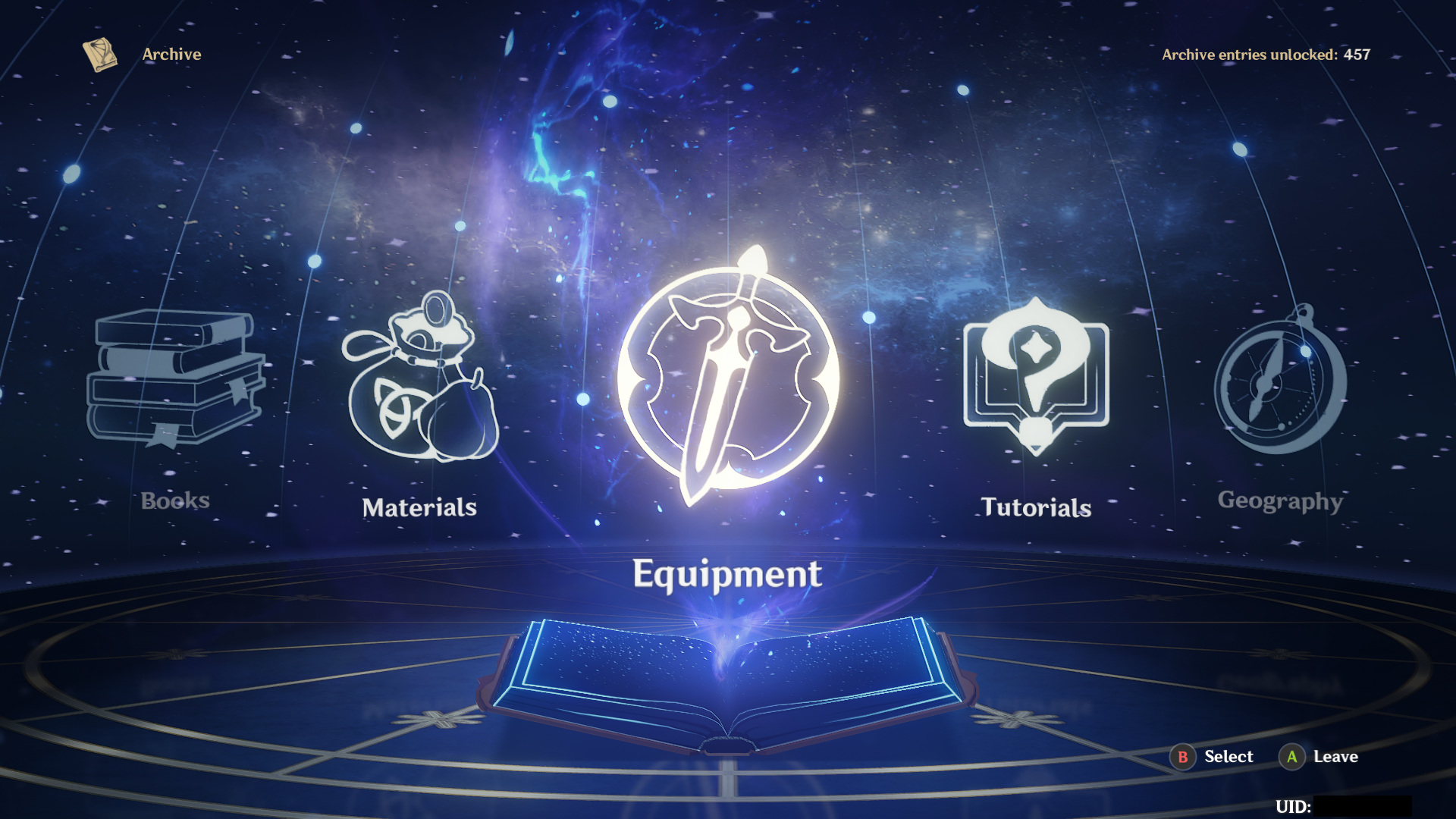
The archive menu in Genshin Impact details many categories and their given subjects. Entries range from tutorial text to equipment to geographical locations, and more, each with its own format to support the subject matter. It creates a single location for players to find deeper information and lore about the game’s entities, but overall, it serves more as an encyclopedia than an objective-setting tool.
BREATH OF THE WILD: HYRULE COMPENDIUM

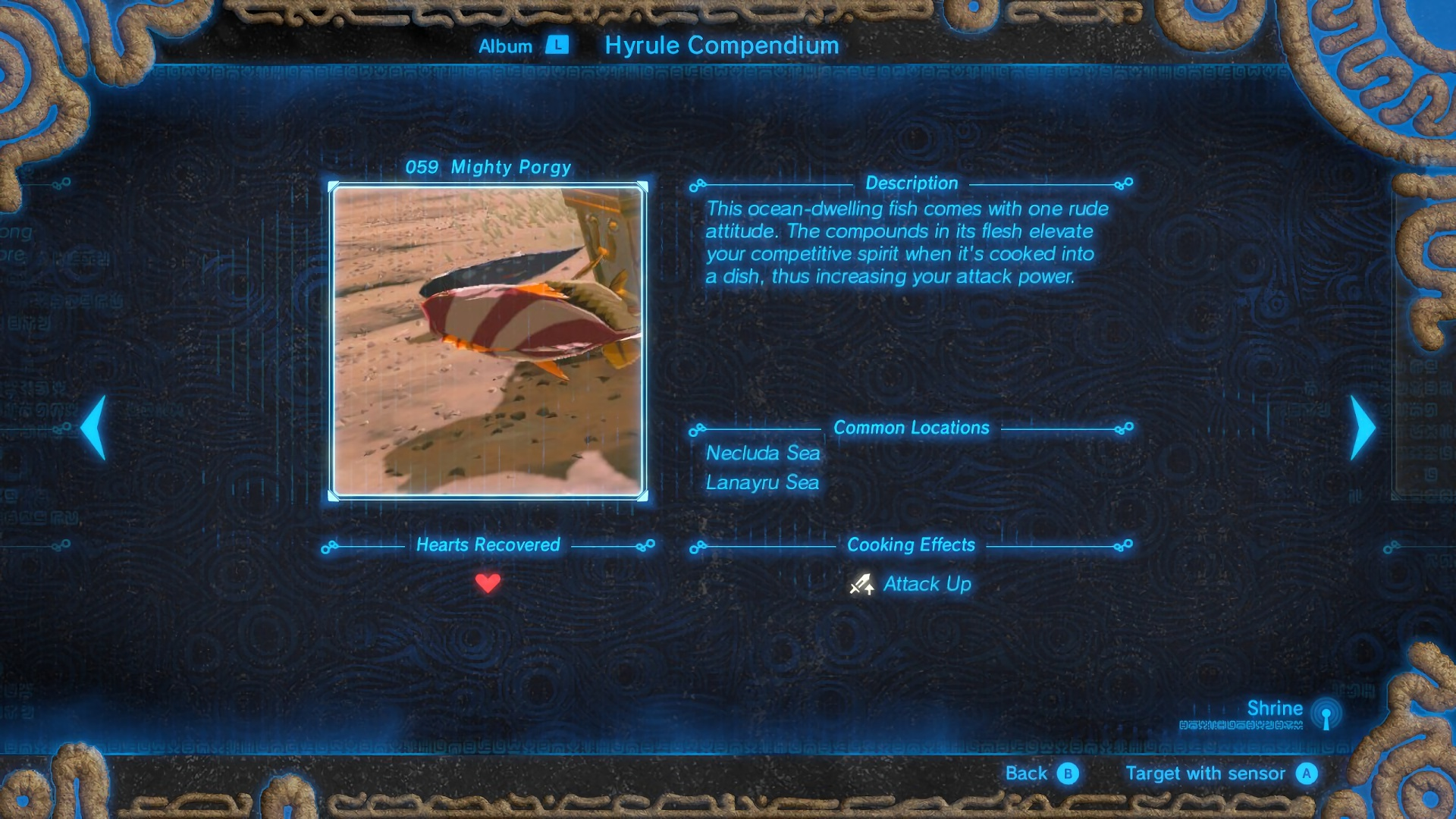
Breath of the Wild’s map stamps interested me for another reason altogether: they had two types of pins that functioned differently. The first was what I began calling concept-based, which relied on an image to portray an idea (e.g., cooking resources, mineral deposits, bosses, etc.). The second was what I noted as abstract-based, conveying no specific concept but instead meant to mark a waypoint for exploration. I found both of these to apply to BitCraft’s players' needs.
WIKIPEDIA + THE WIKI GAME

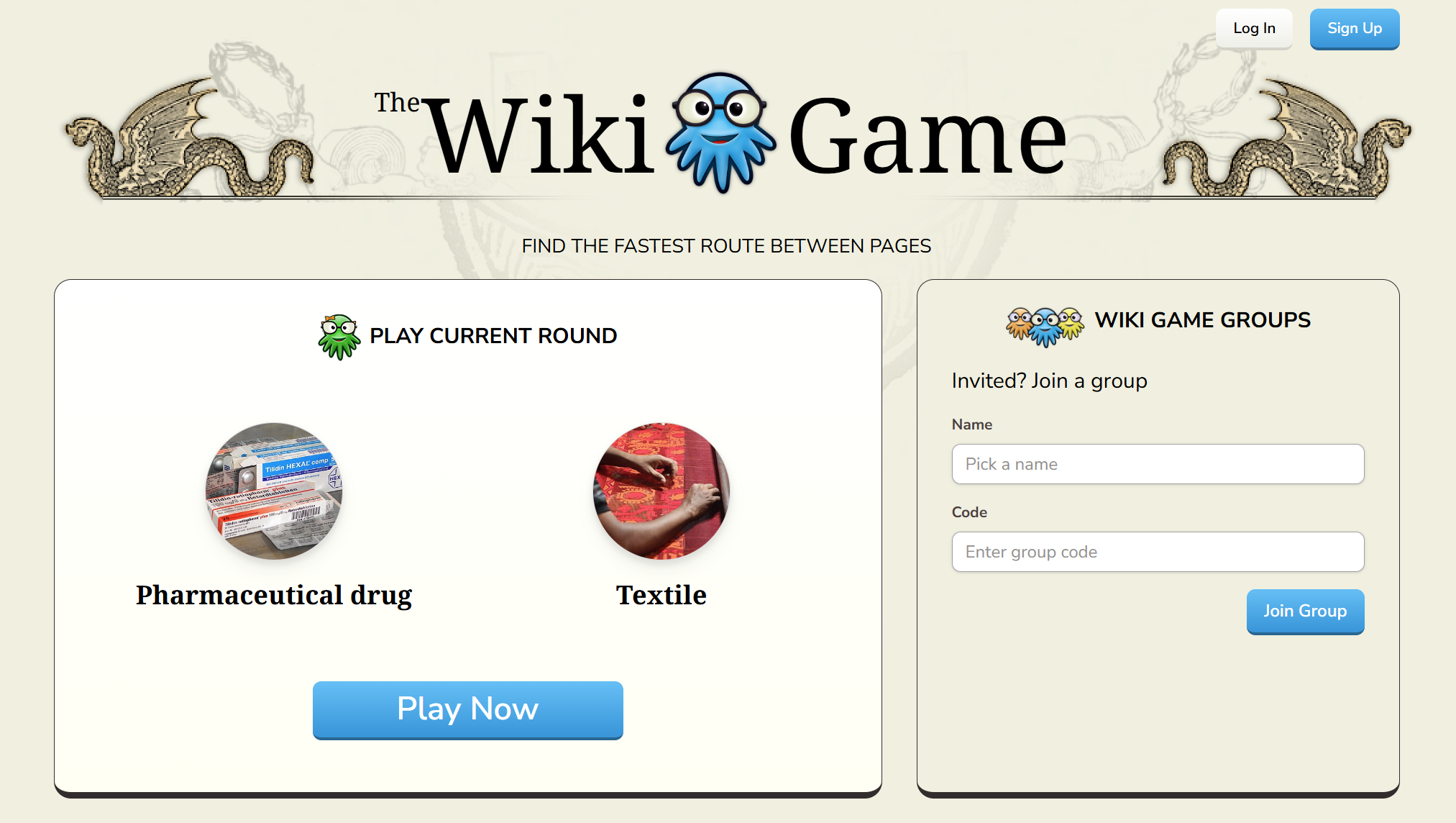
When designing, I stress the importance of not just researching other versions of the same thing. While games fall into a shared design space, it’s crucial to study the everyday tools people use to solve problems. This prevents simply repeating old designs and encourages new, innovative solutions.

With this in mind, given the high number of players spawning and using fan wikis, Wikipedia became a clear reference point. To be more specific, I kept in mind the mindset of The Wiki Game: a game where players use hyperlinks in wiki entries to navigate from one entry to another entirely unrelated entry. This rabbit-hole mindset fits perfectly into BitCraft’s “everything can be used to be turned into something” design.

Conceptualization.

After gathering research insights, the next step was to conceptualize the most effective solution. We knew the solution would need to support different types of players: completionists, explorers, and progression-driven. Inspiration came from tools that answered player questions well, leading to The Compendium: a self-contained, in-game reference to replace external searches. The key feature driving major use cases was hyperlinked entries for smooth navigation between related entities.

The largest challenge was organizing The Compendium’s information hierarchy, especially with the game’s shifting content at the time. Each content shift required reorganizing entities by groups, use cases, and shared relationships.

Proof of Concept

The earliest version of The Compendium was a low-fidelity, clickable prototype created in Figma. From its first iteration, the Compendium’s structure and flow were established— categories on the left, entry navigation in the middle, and the focus area on the right. A few key characteristics of this iteration include:

Tags: This version included tags intended to allow players to quickly narrow their searches and identify what they needed, but they were ultimately removed to better align with the game’s content data.

Navigation Buttons: Back/forward buttons to allow for browsing between entries. While these could be useful for some players who are deep-diving into entries, they ultimately weren't worth the real estate.

Less Information: Made more as a template, this version had fewer categories and held less information because core content refactors had not yet occurred.

Secondary Pass: Improvements and Supporting Complex Entries

Once the concept was approved, it was time to improve upon the most commonly used category within the Compendium: Items. As the game’s content grew, so did the entry data. While only wired for the items category, this comprehensive prototype displays every possible data point applicable to an entry, allowing the team to simply disable those that do not apply to that entry. A few major changes to this iteration include:

Tabs: Because of this information increase, the focus area was split into tabs. Now the leading questions (“What is this?”,  “How can I obtain it?”, “What can I do with it?”) were all easily accessible regardless of the entry.

Filters: To better support the content, the tag system was replaced with filters aligned with existing content data, allowing players to quickly narrow their searches.

Acquired Status: A difference in entity interactions was introduced to the game. Discovered entries were things that the player had seen or witnessed, whereas Acquired entries were things the player had obtained and gained full knowledge of. This status was now reflected in the Compendium’s design.

History: To replace the navigation arrows, a history button was added. This was meant to let players quickly navigate to previously viewed entries and exit the rabbit hole without friction.

Pin Recipe Button: Under the obtain tab, if an entry is craftable, the player could now pin that recipe for later reference. This feature was cut for the time being due to the craft system being reworked.

Final Product

Anatomy of Design

By the time I left the BitCraft team during the alpha, the Compendium had been designed for implementation, but not all features had yet made it into the game. As a result, the following images are prototypes created in Figma utilizing the new UI language designed by the talented Randy Huynh.

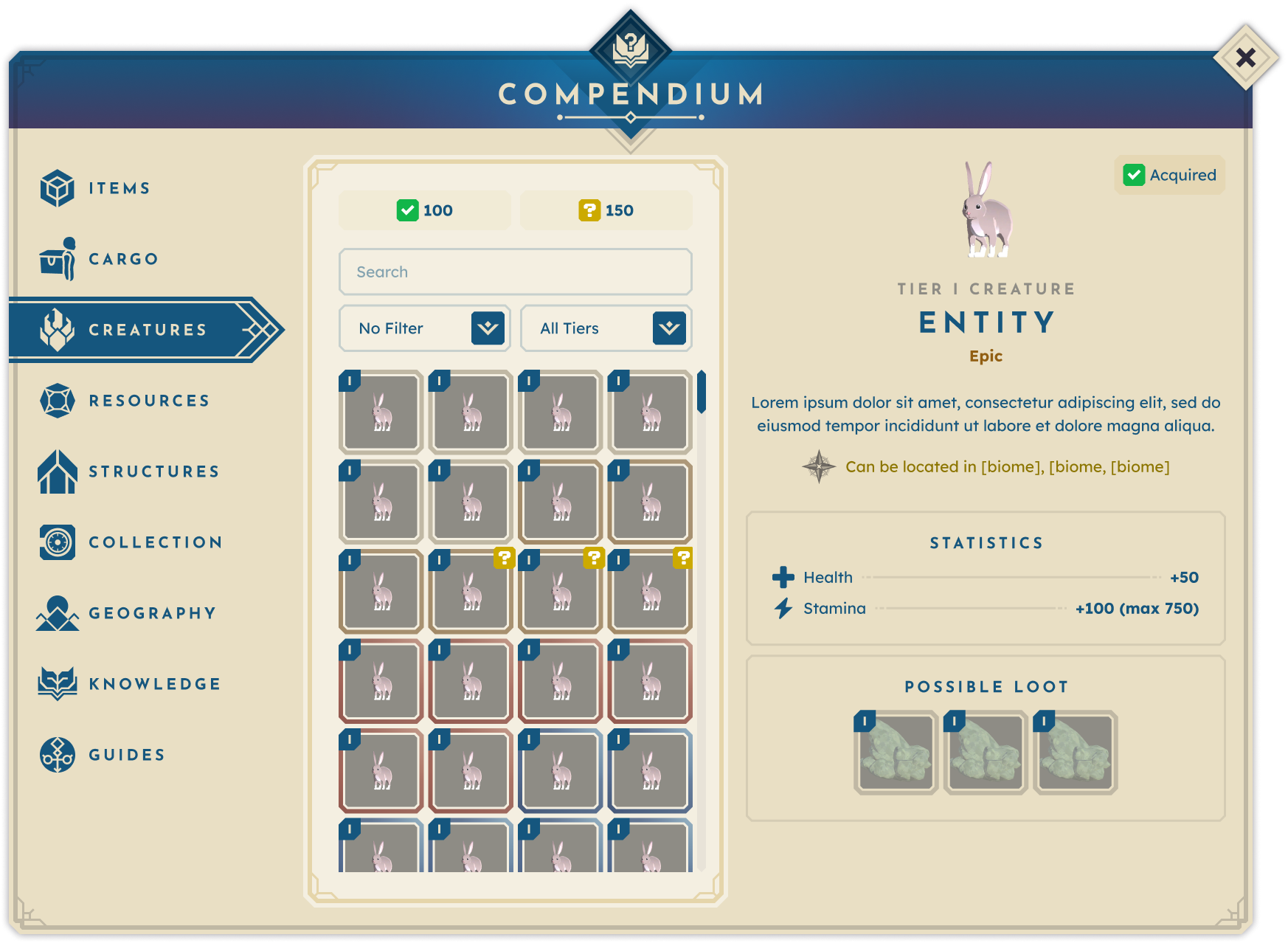
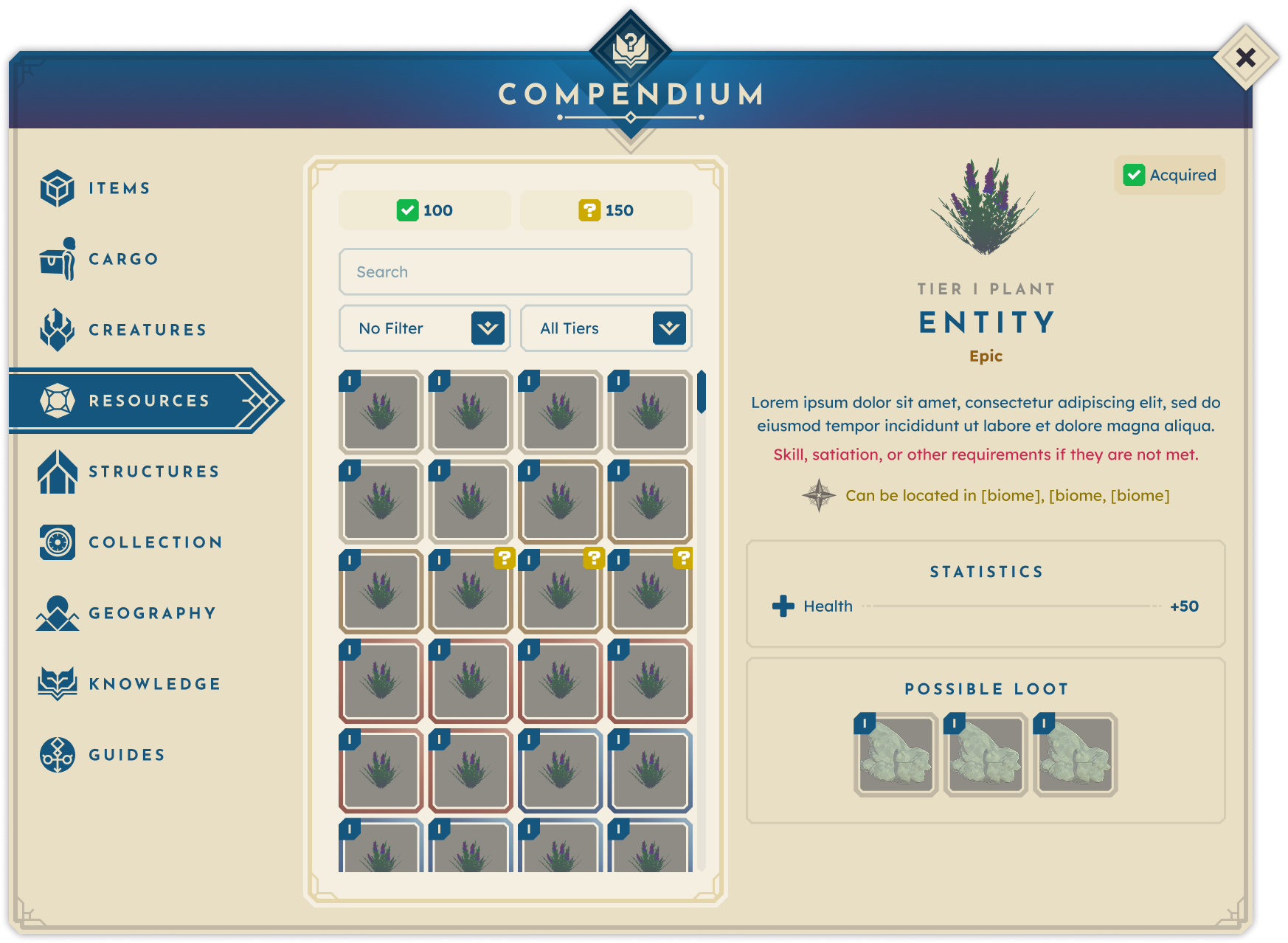
Across the entire design, the Compendium’s anatomy is formally broken into 3 main sections:
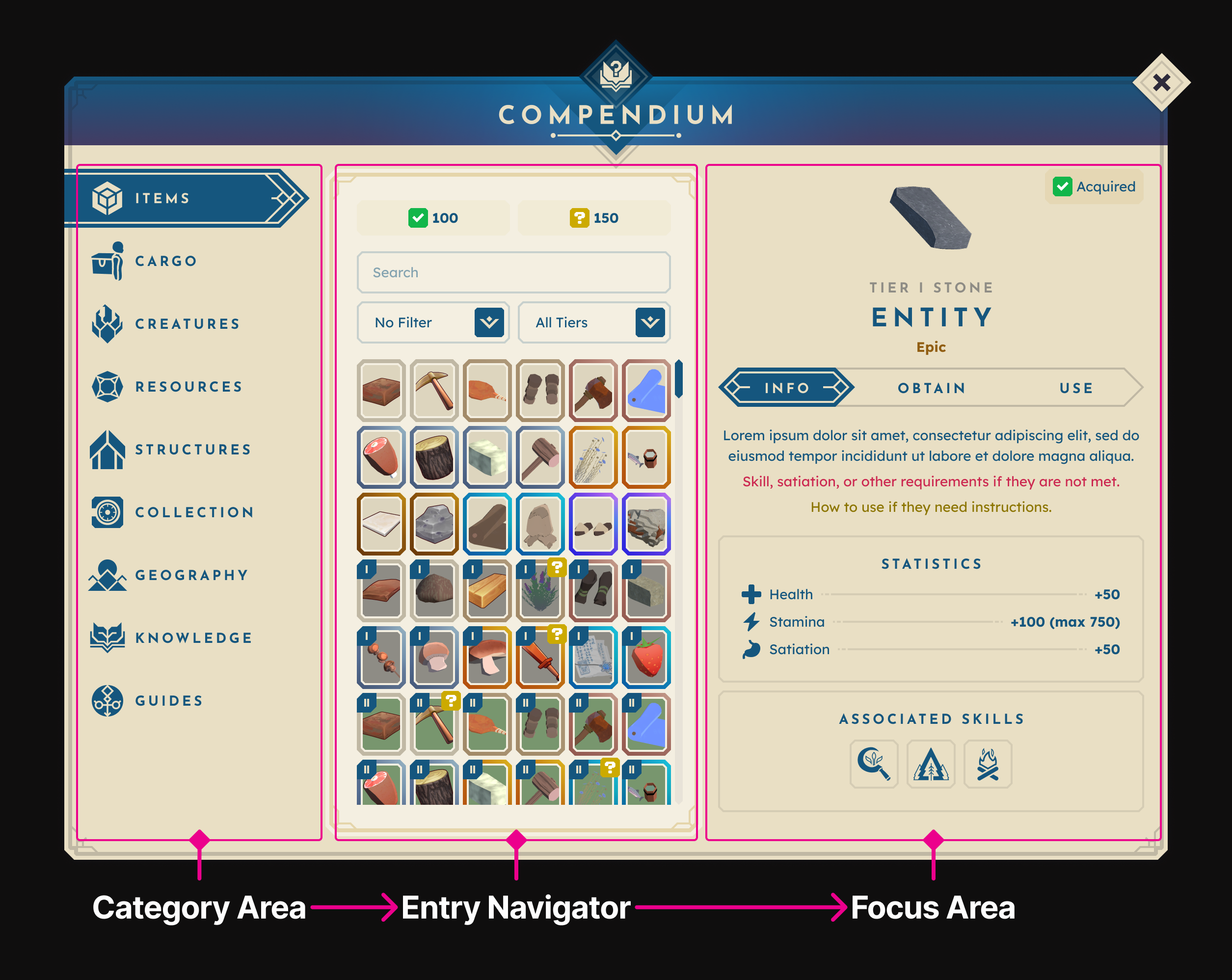
Category Area: The always-visible left-side category panel eliminates the need for players to backtrack through multiple menus.

Entry Navigator: This central section offers search, filtering, and sorting tools to help players quickly find specific entries. Additionally, collection stats provide an extra layer of motivation by encouraging players to complete their Compendium.

Focus Area: The right-side Focus Area displays the selected entry’s details. This section adapts to each category, accommodating unique data types while maintaining consistent layouts for easy scanning.

Items + Cargo

Items and cargo are the most common reasons players open The Compendium, so these categories needed to be robust yet intuitive. While their in-game functions differ, they share many structural elements. I separated them into distinct categories but retained consistent layouts for familiarity. Given the large amount of information needed in these categories, I utilized Miller’s Law, which states that the average person can hold 7 ± 2 items in working memory at a time, but this number can be expanded by chunking information into smaller units. To put this into practice, I structured the entry data into 3 main tabs, each corresponding to the major use cases.

INFO TAB — What is this?

Provides the entry description, interaction requirements, stats, and associated skills. To reduce duplicate work and engineering time, tooltips were directly linked to this tab’s content.
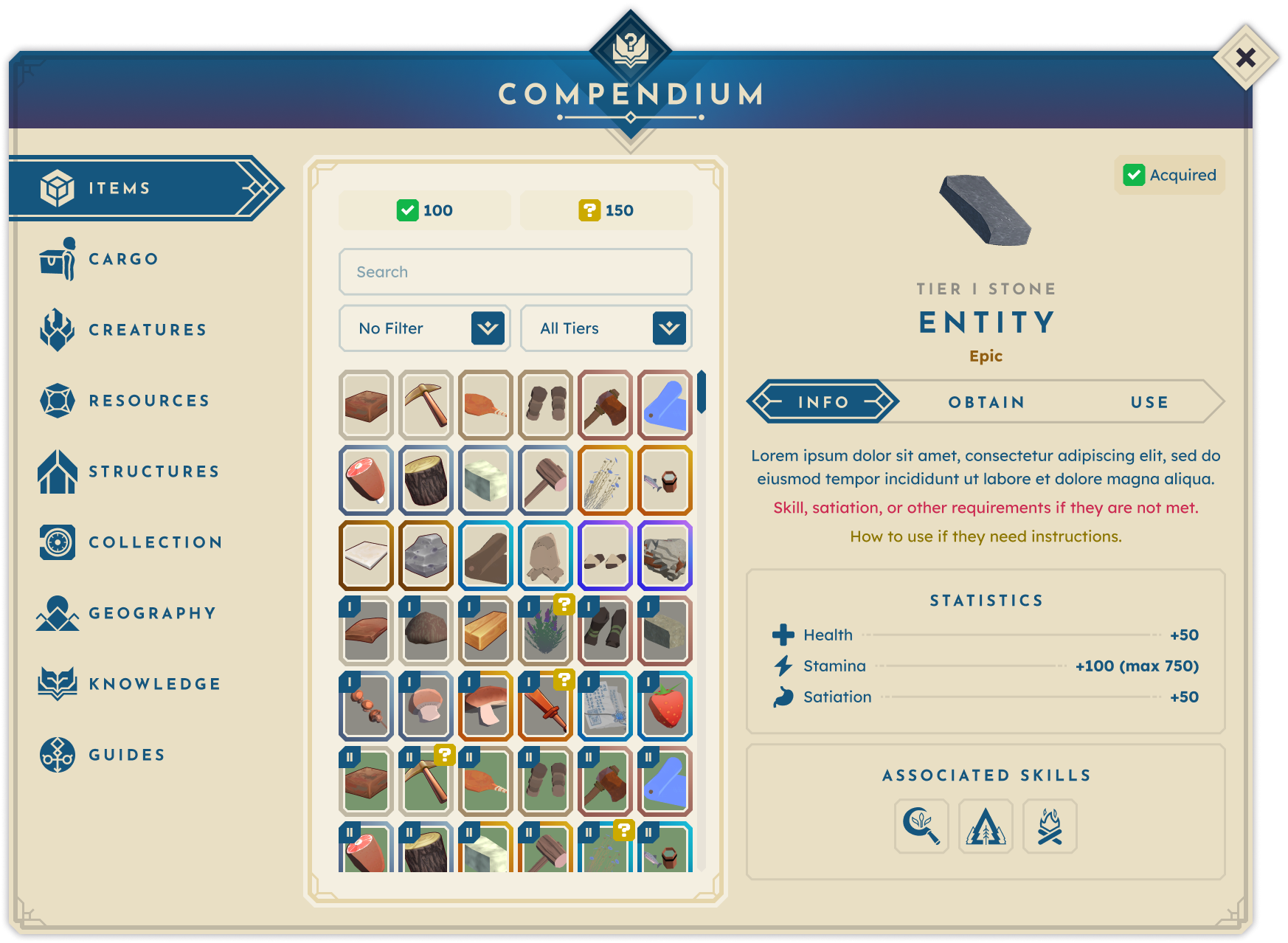
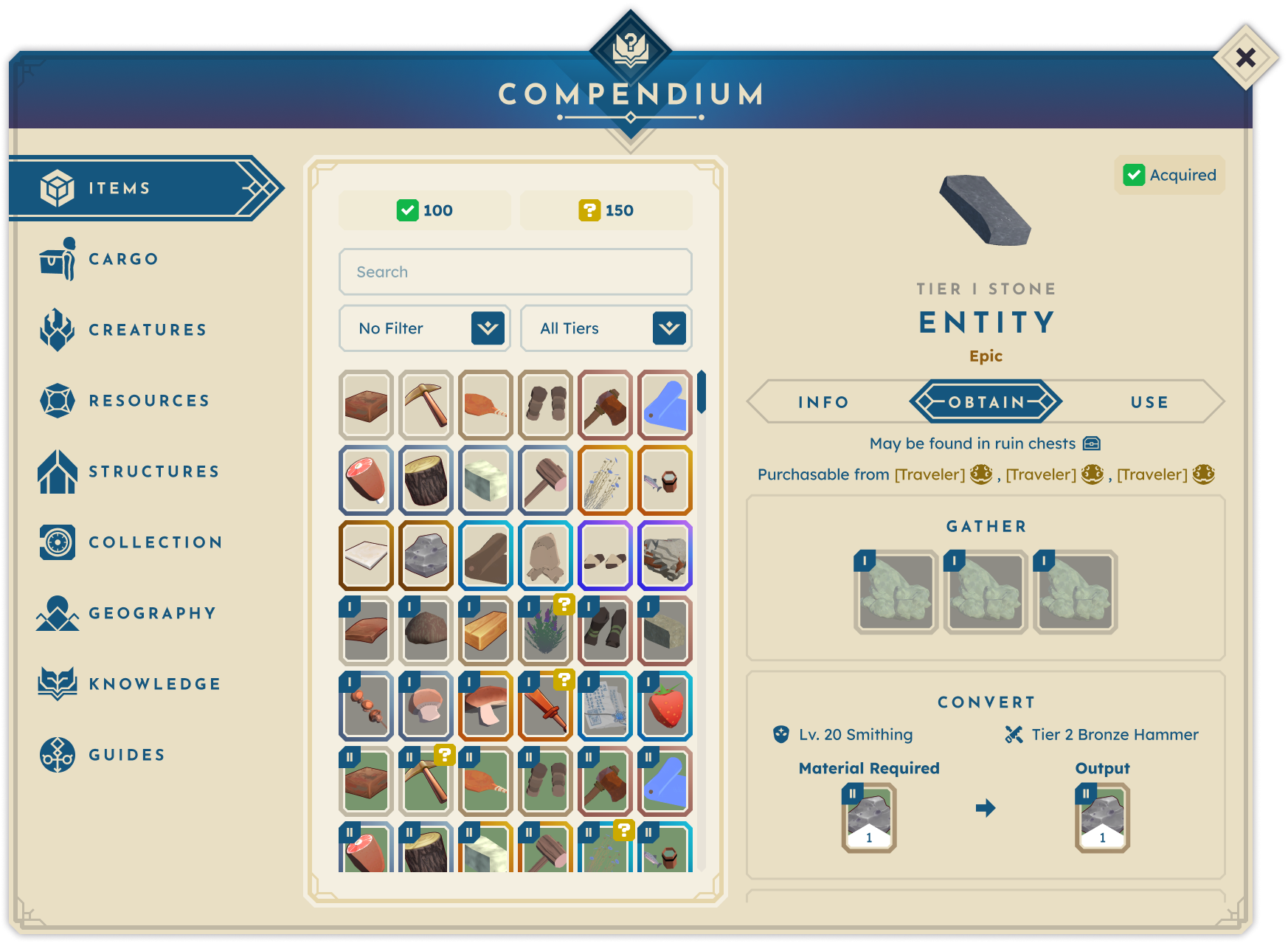
OBTAIN TAB — How can I obtain this?

Details all possible acquisition methods, whether through loot, shops, gathering, crafting, or conversion.
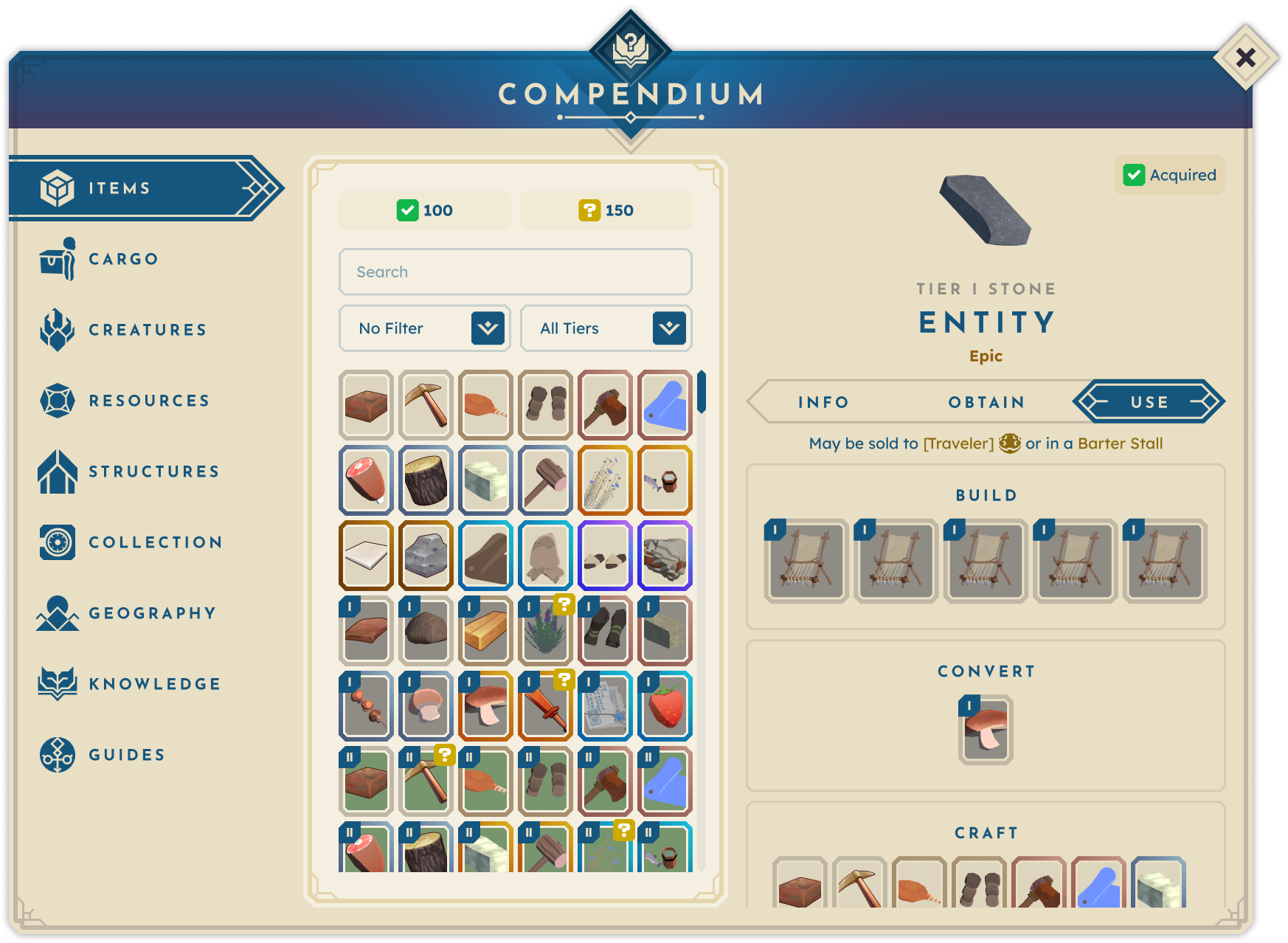
USE TAB — What can I do with this?

Lists all potential uses, recipes, or processes that the entry contributes to — essential in a game where combining inputs is core to progression.
Creatures + Resources

Creatures and resources differ in gameplay: one involves combat encounters, the other is static. But, from a development standpoint, they share the same core data model. Designing them in parallel allowed for a unified structure while preserving category-specific details. Each entry includes core data, location, and yield.
Structures

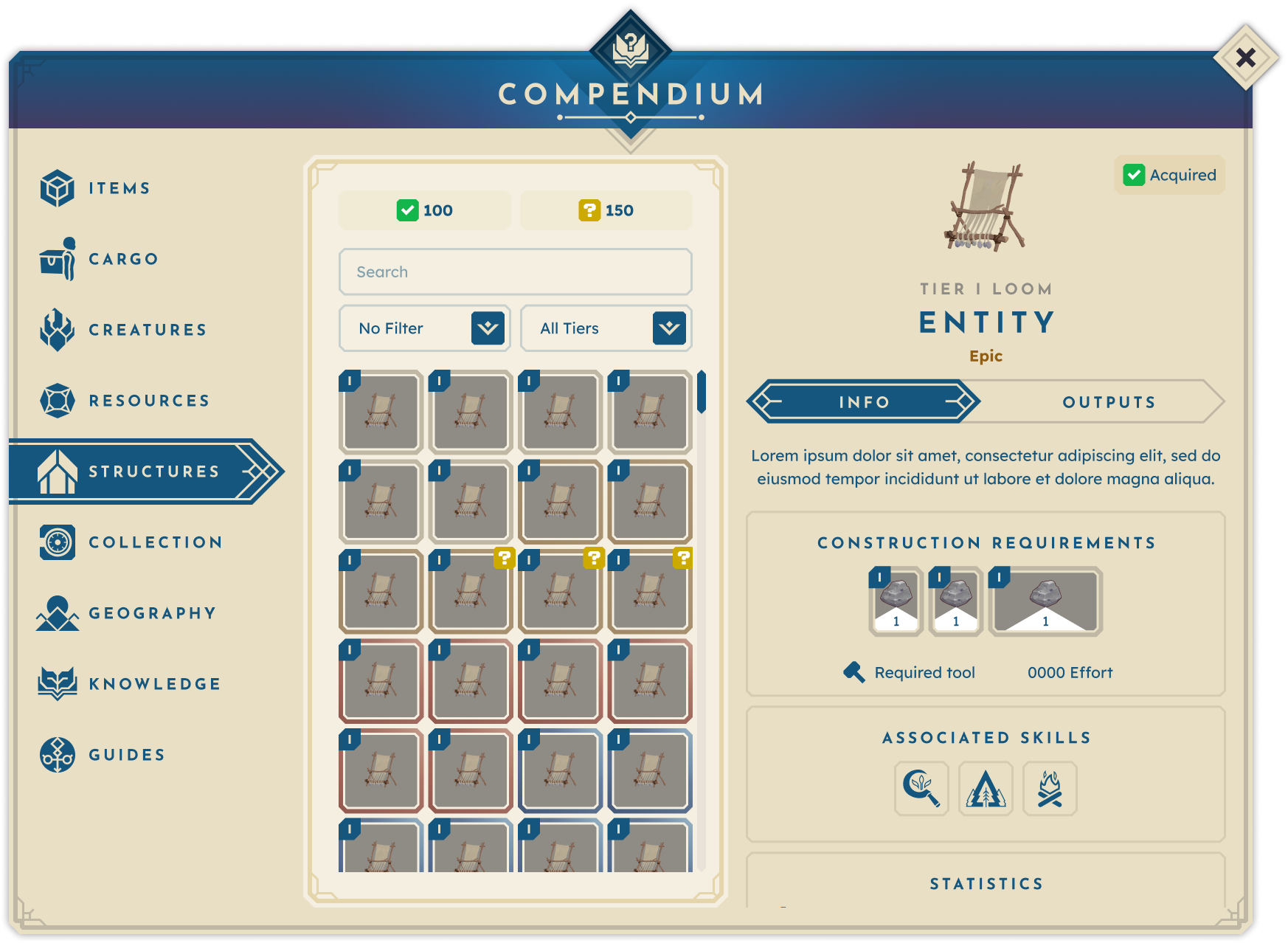
Structures are critical for enabling key player actions such as crafting. Each structure entry includes tier, associated skills, and construction requirements.

INFO TAB — What is this? / How do I obtain this?

Consolidates description, build requirements, and skill associations into one tab to minimize clicks and make use of available space.
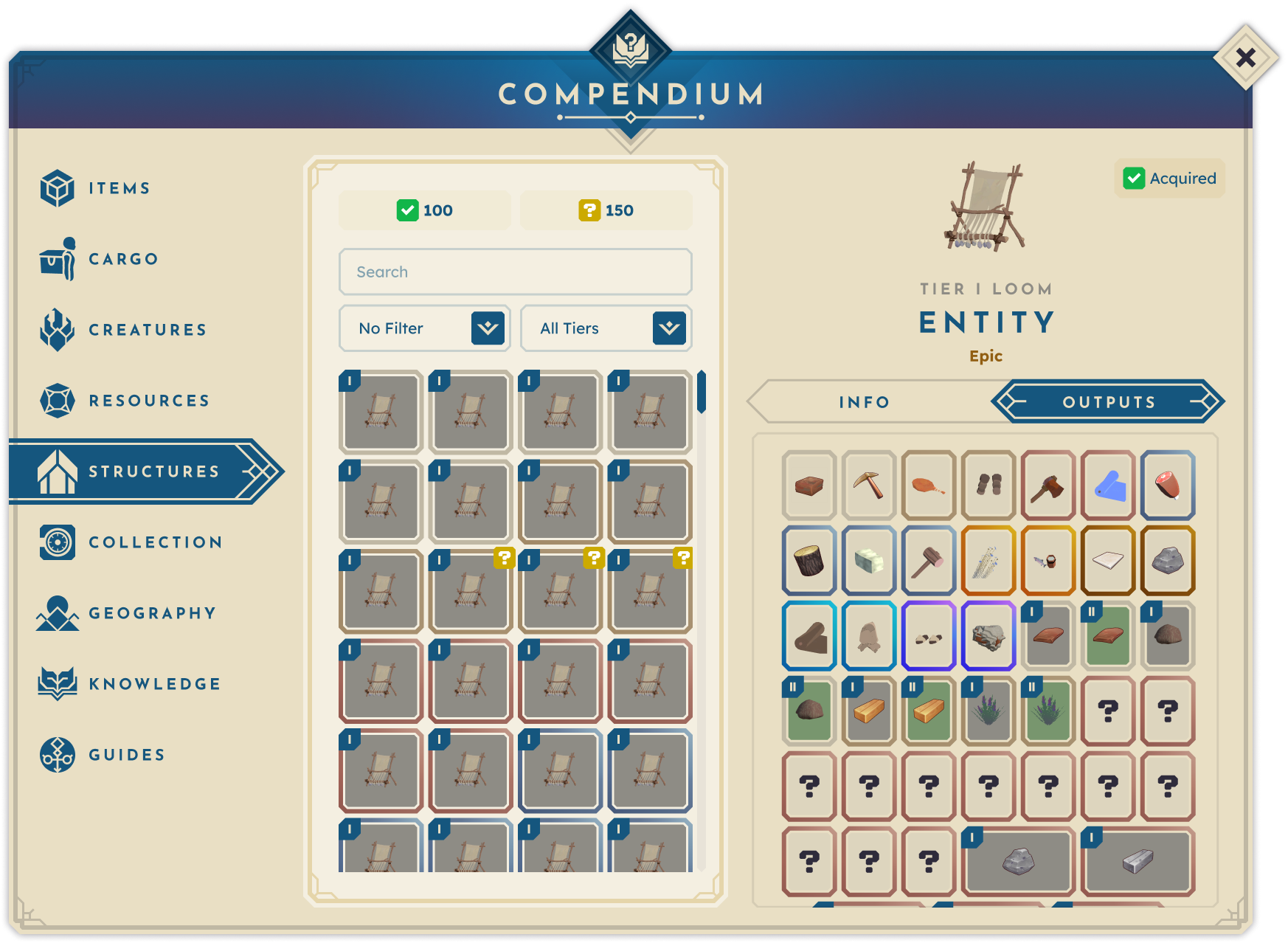
OUTPUTS TAB — What can I do with this?

Lists all crafts and actions enabled by the structure, leveraging The Compendium’s hyperlink system for quick recipe access.
Collectibles

Collectibles are unique entities, typically cosmetic, that players can earn through special circumstances, such as reaching a particular skill level. Each collectible entry is given the usual data, plus set data, and an “in Vault” (Vault being where they are stored vs. the typical inventory) in place of the typical “acquired” status.
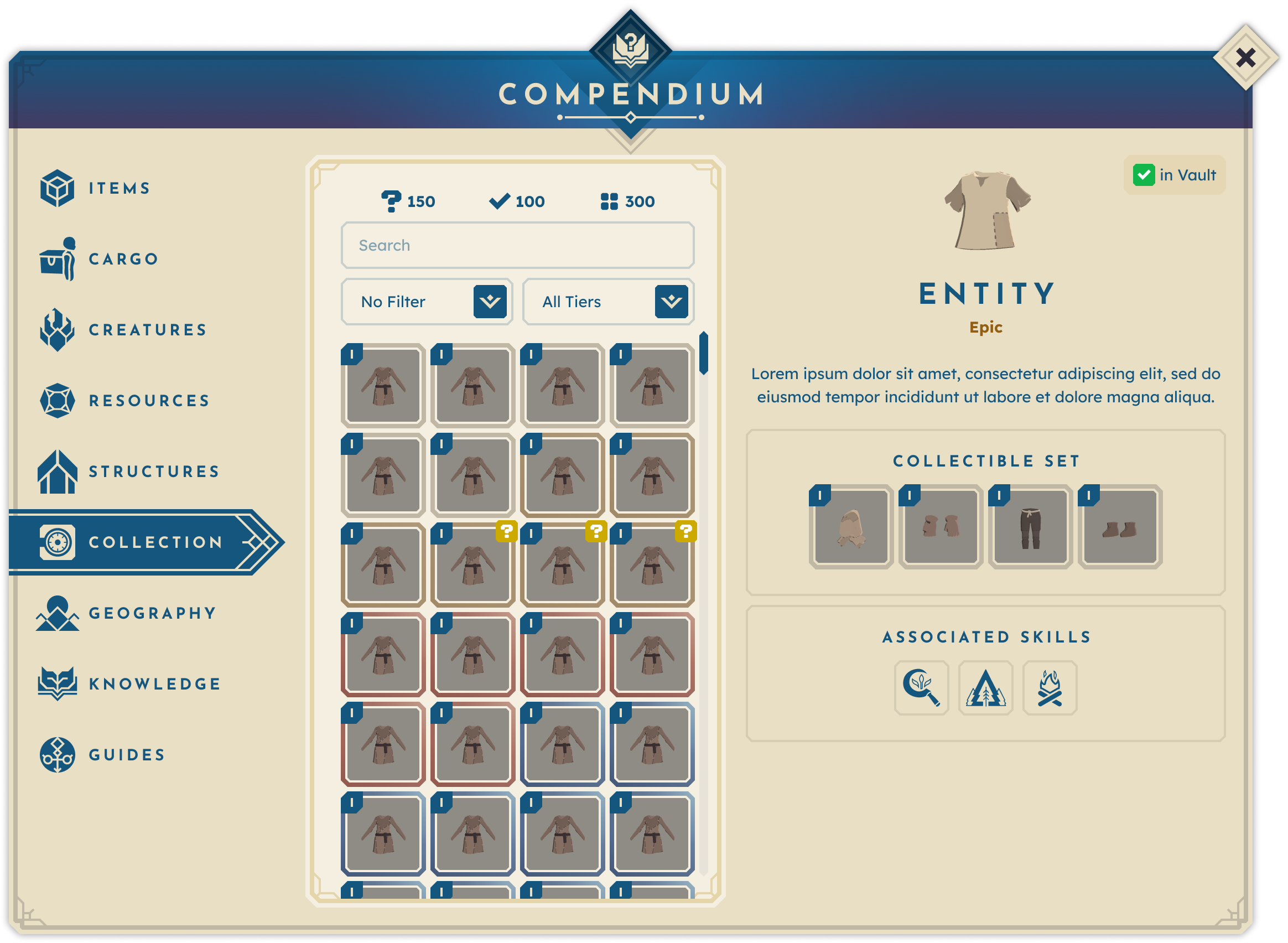
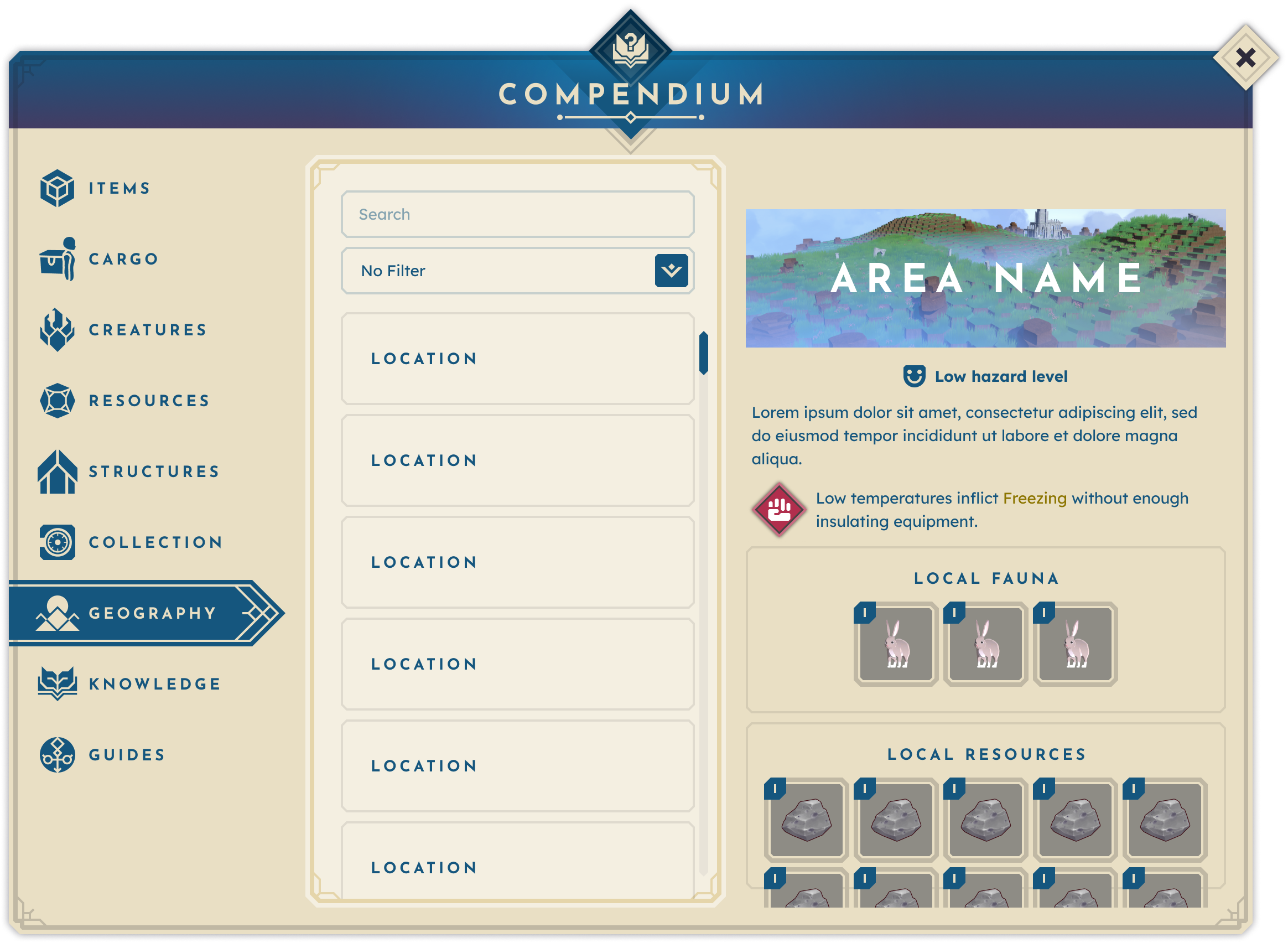
Geography

BitCraft’s world is divided into diverse biomes, each with unique resources, hazards, and strategic advantages. The Geography section lets players compare biomes and make informed settlement decisions with a clear overview.
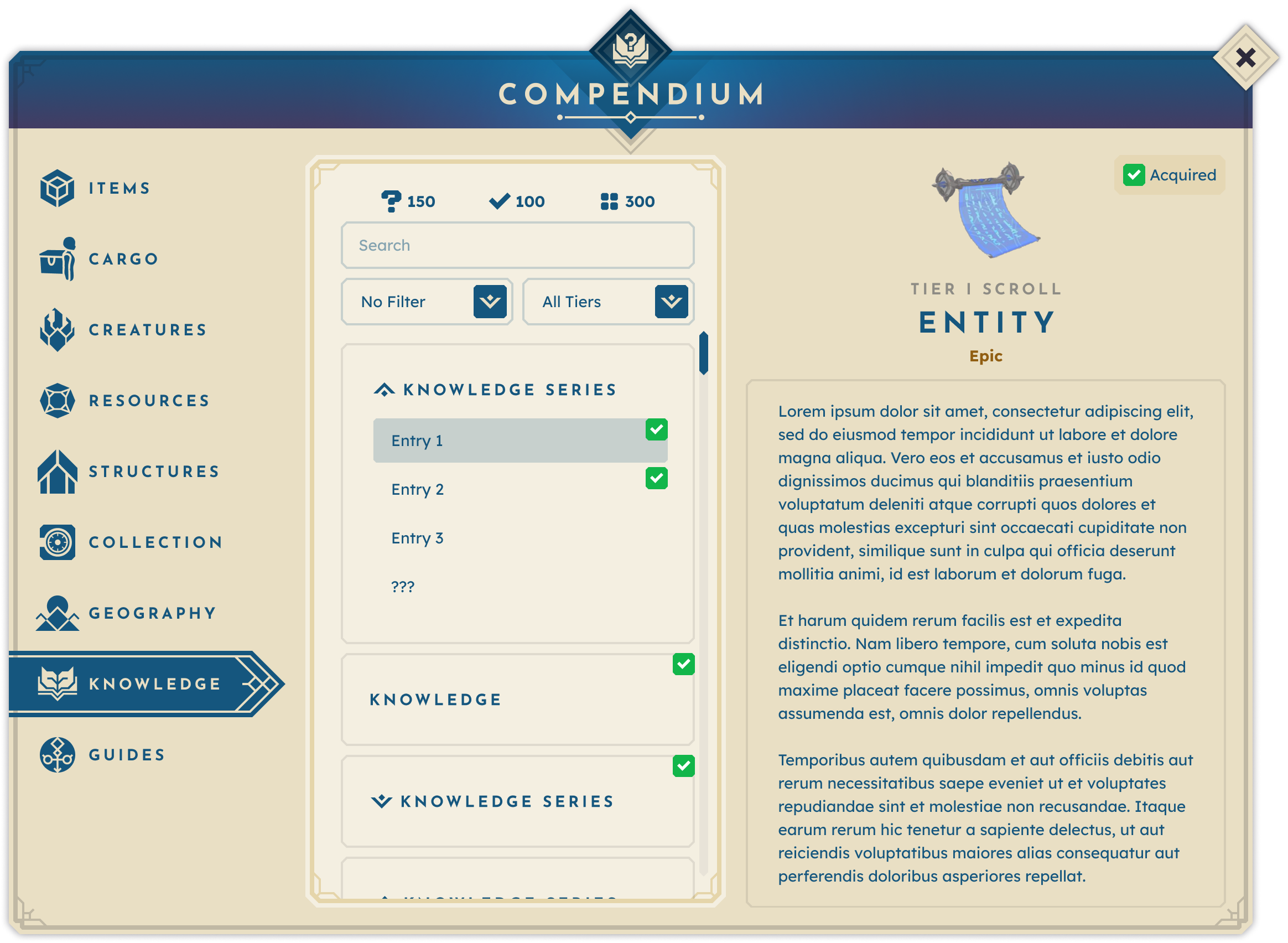
Knowledge

Knowledge is a core progression system in BitCraft, with many gameplay features gated behind scrolls containing recipes, lore, or riddles. The Knowledge category in The Compendium serves as the player’s permanent record of these findings, allowing them to revisit and review at any time.
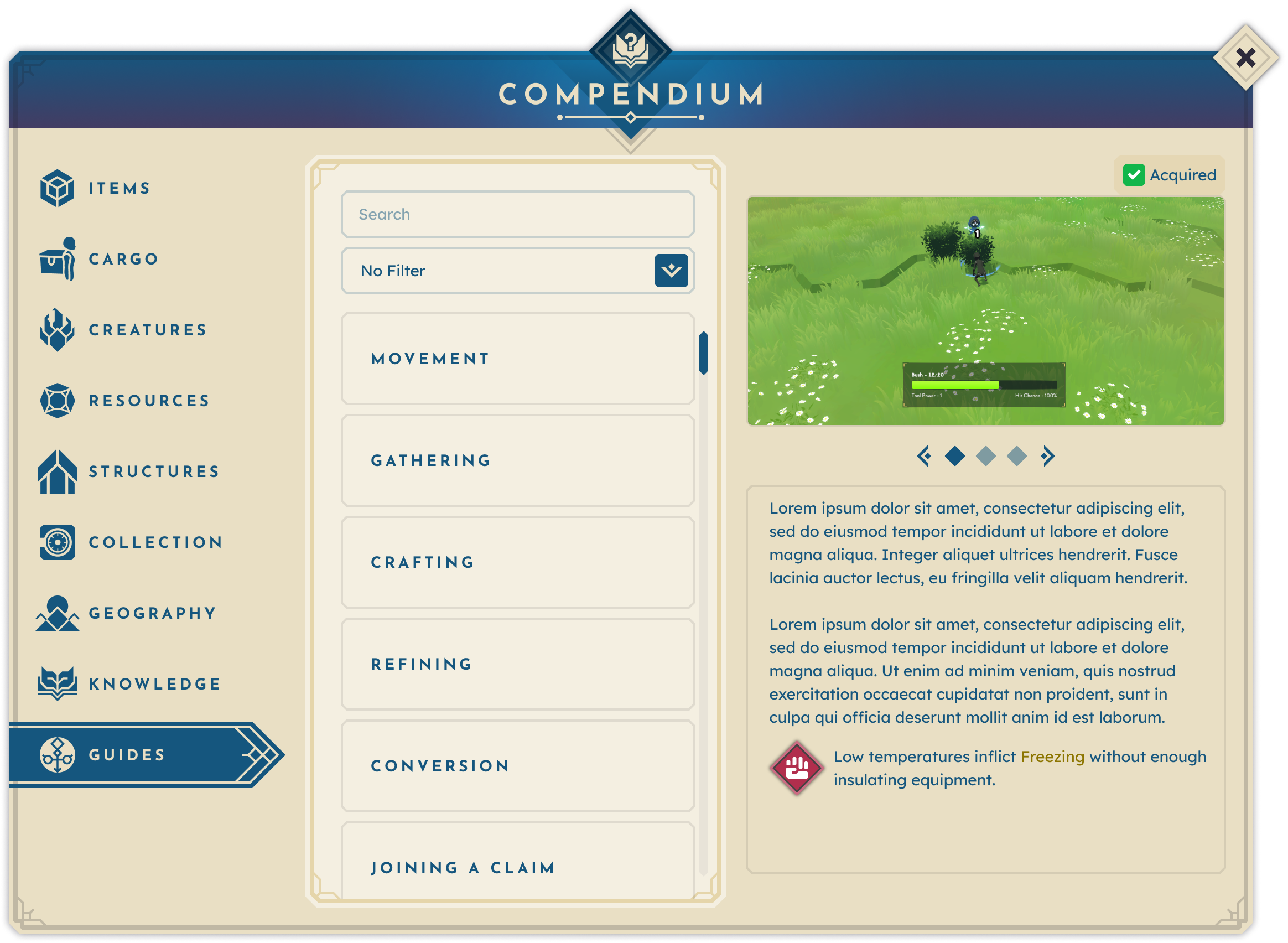
Guides

The Guides category addresses a common player frustration: forgetting or skipping tutorial content. Here, players can revisit past tutorial topics, review summaries, and re-learn mechanics at their own pace — ensuring no one is left behind.
Outcomes & Reflections.

Even in its staged rollout, with limited tabs and no hyperlinking, The Compendium significantly improved player self-sufficiency. Players stopped turning to Discord for routine questions and instead began finding answers directly in-game, a trend that only increased as more of the intended design was implemented. As further updates were released, I would conduct surveys, interviews, gameplay observations, review public chat logs, and playtest to monitor player sentiment. A shift in playstyle and community became apparent: The Compendium had become a trusted reference for new players and a verification tool for veterans, sparking social interaction as players shared recipes and compared entries like a Pokédex. The Compendium established itself as an essential resource in the player’s toolkit, reducing friction, increasing retention, and reinforcing BitCraft’s world as a rich, interconnected system.

Get in Touch.

Resume

LinkedIn

Contact

Compendium

BitCraft Online

A photo of BitCraft Online's compendium.

PROJECT

The Compendium

The Compendium is an in-game, authoritative index for all player-facing details about game objects, features, and relationships. Entries are organized, tagged, and hyperlinked for easy, seamless navigation.

ROLE

Lead UX Designer

As Lead UX Designer for BitCraft Online and one of the game’s earliest team members, I evaluated the project during its early development and identified key opportunities for improvement. This role was hands-on, giving me the opportunity to work from research through conception to implementation.

DELIVERABLES

  • User & market research
  • Data synthesis + insight development
  • Logic + hierarchy building
  • Conducting team workshops
  • Wireframes
  • Interactive + static prototypes
  • Pre-alpha UI design
  • Hand off and implementation documentation
  • Feedback collection + synthesis

The Process.

No design is complete without process, and the Compendium is no exception. By connecting research, ideation, and implementation, each stage built on the last to deliver a cohesive in-game resource.

Why does this design matter?

BitCraft is a massively multiplayer community sandbox game where players work together to build a new civilization in a single, editable wilderness with an ancient past. BitCraft’s gameplay emphasizes skilling, building, crafting, farming, trading, and exploring, empowering players to cultivate a sheltered village with their friends or establish impressive cities and empires.

— Official BitCraft Online Website

BitCraft’s vast world contains countless resources, crafts, collectibles, structures, knowledge systems, and mechanics to track. After joining, I quickly recognized some key insights about this wealth of information:

  • Scattered information sources made it difficult to keep track of the countless in-game entities and their relationships, constantly straining the player’s working memory.
  • The lack of clarity surrounding crucial gameplay elements and actions left players unsure of what to do next.
  • Feelings of frustration and overwhelm led players to lose motivation to progress.

These pain points were further informed by a pattern of frequently asked questions that arose during every test phase: “How do I craft [item]?”, “Where can I find [resource]?”, “What structure do I need to [action]?”, “How do I [action]? I forgot what the tutorial said.” These insights and observations combined to form the leading problem statement:

BitCraft is a massively multiplayer community sandbox game where players work together to build a new civilization in a single, editable wilderness with an ancient past. BitCraft’s gameplay emphasizes skilling, building, crafting, farming, trading, and exploring, empowering players to cultivate a sheltered village with their friends or establish impressive cities and empires.

— Official BitCraft Online Website

BitCraft’s vast world contains countless resources, crafts, collectibles, structures, knowledge systems, and mechanics to track. After joining, I quickly recognized some key insights about this wealth of information:

  • Scattered information sources made it difficult to keep track of the countless in-game entities and their relationships, constantly straining the player’s working memory.
  • The lack of clarity surrounding crucial gameplay elements and actions left players unsure of what to do next.
  • Feelings of frustration and overwhelm led players to lose motivation to progress.

These pain points were further informed by a pattern of frequently asked questions that arose during every test phase: “How do I craft [item]?”, “Where can I find [resource]?”, “What structure do I need to [action]?”, “How do I [action]? I forgot what the tutorial said.” These insights and observations combined to form the leading problem statement:

Players struggle to set objectives when essential information is scattered, overwhelming their cognitive load and leading to frustration and disengagement.

Goals & Objectives.

After defining the problem, I set four main actionable objectives for the solution:

CREATE A CENTRALIZED SOURCE OF TRUTH

In BitCraft, everything connects— resources can be gathered, crafted, converted, or used in structures, forming a complex web of relationships. To help players understand the game, a single comprehensive source of truth is necessary.

KEEP PLAYERS IN-GAME

Many players turn to wikis, guides, and Discord for answers, disrupting immersion by constantly switching between the game and external resources. Our solution aimed to keep players engaged within the game.

ANSWER THE CORE QUESTIONS

Each entry should be structured to answer, when applicable:

  1. What is this?
  2. How can I obtain it?
  3. What can I do with it?

This framework keeps entries concise, actionable, and easy to navigate while ensuring each provides complete, relevant information.

ENABLE PLAYERS TO SET THEIR OWN OBJECTIVES

Once players have access to information, they need to be able to act on it. By making clear what something is, how to obtain it, and how to use it, the objective is to empower players to pursue their goals. These focus areas shaped the main design question we took into the next phase:

How might we help players confidently set their objectives by providing a clear, self-contained knowledge system that eliminates the need for external searches?

Market Research.

To kick off the research phase and deepen my understanding of the space, I looked into how existing solutions handled similar issues. I focused on the following key question: What in-game solutions do others use? What works and what fails? Why do players still seek outside resources?

This research led to these key findings:

  • Games with similar content commonly address these challenges by using in-game codices, journals, and archives to centralize information for players.
  • If the provided information is not centralized or accessible, players turn to external sources like wikis or Discord.
  • Players want to “follow the rabbit hole” within entries: for example, “I gather X material using X tool and craft X item at X structure.”
  • Players seek planning tools to manage time and required materials for activities.

I began gathering references to the most commonly used, favored, and unique solutions during my research. This included:

Genshin Impact: Archive

The archive menu in Genshin Impact details many categories and their given subjects. Entries range from tutorial text to equipment to geographical locations, and more, each with its own format to support the subject matter. It creates a single location for players to find deeper information and lore about the game’s entities, but overall, it serves more as an encyclopedia than an objective-setting tool.

BREATH OF THE WILD: HYRULE COMPENDIUM

Breath of the Wild’s map stamps interested me for another reason altogether: they had two types of pins that functioned differently. The first was what I began calling concept-based, which relied on an image to portray an idea (e.g., cooking resources, mineral deposits, bosses, etc.). The second was what I noted as abstract-based, conveying no specific concept but instead meant to mark a waypoint for exploration. I found both of these to apply to BitCraft’s players' needs.

WIKIPEDIA + THE WIKI GAME

When designing, I stress the importance of not just researching other versions of the same thing. While games fall into a shared design space, it’s crucial to study the everyday tools people use to solve problems. This prevents simply repeating old designs and encourages new, innovative solutions.

With this in mind, given the high number of players spawning and using fan wikis, Wikipedia became a clear reference point. To be more specific, I kept in mind the mindset of The Wiki Game: a game where players use hyperlinks in wiki entries to navigate from one entry to another entirely unrelated entry. This rabbit-hole mindset fits perfectly into BitCraft’s “everything can be used to be turned into something” design.

Conceptualization.

After gathering research insights, the next step was to conceptualize the most effective solution. We knew the solution would need to support different types of players: completionists, explorers, and progression-driven. Inspiration came from tools that answered player questions well, leading to The Compendium: a self-contained, in-game reference to replace external searches. The key feature driving major use cases was hyperlinked entries for smooth navigation between related entities.

The largest challenge was organizing The Compendium’s information hierarchy, especially with the game’s shifting content at the time. Each content shift required reorganizing entities by groups, use cases, and shared relationships.

Proof of Concept

The earliest version of The Compendium was a low-fidelity, clickable prototype created in Figma. From its first iteration, the Compendium’s structure and flow were established— categories on the left, entry navigation in the middle, and the focus area on the right. A few key characteristics of this iteration include:

Tags: This version included tags intended to allow players to quickly narrow their searches and identify what they needed, but they were ultimately removed to better align with the game’s content data.

Navigation Buttons: Back/forward buttons to allow for browsing between entries. While these could be useful for some players who are deep-diving into entries, they ultimately weren't worth the real estate.

Less Information: Made more as a template, this version had fewer categories and held less information because core content refactors had not yet occurred.

Secondary Pass: Improvements and Supporting Complex Entries

Once the concept was approved, it was time to improve upon the most commonly used category within the Compendium: Items. As the game’s content grew, so did the entry data. While only wired for the items category, this comprehensive prototype displays every possible data point applicable to an entry, allowing the team to simply disable those that do not apply to that entry. A few major changes to this iteration include:

Tabs: Because of this information increase, the focus area was split into tabs. Now the leading questions (“What is this?”,  “How can I obtain it?”, “What can I do with it?”) were all easily accessible regardless of the entry.

Filters: To better support the content, the tag system was replaced with filters aligned with existing content data, allowing players to quickly narrow their searches.

Acquired Status: A difference in entity interactions was introduced to the game. Discovered entries were things that the player had seen or witnessed, whereas Acquired entries were things the player had obtained and gained full knowledge of. This status was now reflected in the Compendium’s design.

History: To replace the navigation arrows, a history button was added. This was meant to let players quickly navigate to previously viewed entries and exit the rabbit hole without friction.

Pin Recipe Button: Under the obtain tab, if an entry is craftable, the player could now pin that recipe for later reference. This feature was cut for the time being due to the craft system being reworked.

Final Product

Anatomy of Design

By the time I left the BitCraft team during the alpha, the Compendium had been designed for implementation, but not all features had yet made it into the game. As a result, the following images are prototypes created in Figma utilizing the new UI language designed by the talented Randy Huynh.

Across the entire design, the Compendium’s anatomy is formally broken into 3 main sections:

Category Area: The always-visible left-side category panel eliminates the need for players to backtrack through multiple menus.

Entry Navigator: This central section offers search, filtering, and sorting tools to help players quickly find specific entries. Additionally, collection stats provide an extra layer of motivation by encouraging players to complete their Compendium.

Focus Area: The right-side Focus Area displays the selected entry’s details. This section adapts to each category, accommodating unique data types while maintaining consistent layouts for easy scanning.

Items + Cargo

Items and cargo are the most common reasons players open The Compendium, so these categories needed to be robust yet intuitive. While their in-game functions differ, they share many structural elements. I separated them into distinct categories but retained consistent layouts for familiarity. Given the large amount of information needed in these categories, I utilized Miller’s Law, which states that the average person can hold 7 ± 2 items in working memory at a time, but this number can be expanded by chunking information into smaller units. To put this into practice, I structured the entry data into 3 main tabs, each corresponding to the major use cases.

INFO TAB — What is this?

Provides the entry description, interaction requirements, stats, and associated skills. To reduce duplicate work and engineering time, tooltips were directly linked to this tab’s content.

OBTAIN TAB — How can I obtain this?

Details all possible acquisition methods, whether through loot, shops, gathering, crafting, or conversion.

USE TAB — What can I do with this?

Lists all potential uses, recipes, or processes that the entry contributes to — essential in a game where combining inputs is core to progression.

Creatures + Resources

Creatures and resources differ in gameplay: one involves combat encounters, the other is static. But, from a development standpoint, they share the same core data model. Designing them in parallel allowed for a unified structure while preserving category-specific details. Each entry includes core data, location, and yield.

Structures

Structures are critical for enabling key player actions such as crafting. Each structure entry includes tier, associated skills, and construction requirements.

INFO TAB — What is this? / How do I obtain this?

Consolidates description, build requirements, and skill associations into one tab to minimize clicks and make use of available space.

OUTPUTS TAB — What can I do with this?

Lists all crafts and actions enabled by the structure, leveraging The Compendium’s hyperlink system for quick recipe access.

Collectibles

Collectibles are unique entities, typically cosmetic, that players can earn through special circumstances, such as reaching a particular skill level. Each collectible entry is given the usual data, plus set data, and an “in Vault” (Vault being where they are stored vs. the typical inventory) in place of the typical “acquired” status.

Geography

BitCraft’s world is divided into diverse biomes, each with unique resources, hazards, and strategic advantages. The Geography section lets players compare biomes and make informed settlement decisions with a clear overview.

Knowledge

Knowledge is a core progression system in BitCraft, with many gameplay features gated behind scrolls containing recipes, lore, or riddles. The Knowledge category in The Compendium serves as the player’s permanent record of these findings, allowing them to revisit and review at any time.

Guides

The Guides category addresses a common player frustration: forgetting or skipping tutorial content. Here, players can revisit past tutorial topics, review summaries, and re-learn mechanics at their own pace — ensuring no one is left behind.

Outcomes & Reflections.

Even in its staged rollout, with limited tabs and no hyperlinking, The Compendium significantly improved player self-sufficiency. Players stopped turning to Discord for routine questions and instead began finding answers directly in-game, a trend that only increased as more of the intended design was implemented. As further updates were released, I would conduct surveys, interviews, gameplay observations, review public chat logs, and playtest to monitor player sentiment. A shift in playstyle and community became apparent: The Compendium had become a trusted reference for new players and a verification tool for veterans, sparking social interaction as players shared recipes and compared entries like a Pokédex. The Compendium established itself as an essential resource in the player’s toolkit, reducing friction, increasing retention, and reinforcing BitCraft’s world as a rich, interconnected system.

Get in Touch.

Resume

LinkedIn

Contact

Compendium

BitCraft Online

A photo of BitCraft Online's compendium.

PROJECT

The Compendium

The Compendium is an in-game, authoritative index for all player-facing details about game objects, features, and relationships. Entries are organized, tagged, and hyperlinked for easy, seamless navigation.

DELIVERABLES

  • User & market research
  • Data synthesis + insight development
  • Logic + hierarchy building
  • Conducting team workshops
  • Wireframes
  • Interactive + static prototypes
  • Pre-alpha UI design
  • Hand off and implementation documentation
  • Feedback collection + synthesis

The Process.

No design is complete without process, and the Compendium is no exception. By connecting research, ideation, and implementation, each stage built on the last to deliver a cohesive in-game resource.

Why does this design matter?

BitCraft is a massively multiplayer community sandbox game where players work together to build a new civilization in a single, editable wilderness with an ancient past. BitCraft’s gameplay emphasizes skilling, building, crafting, farming, trading, and exploring, empowering players to cultivate a sheltered village with their friends or establish impressive cities and empires.

— Official BitCraft Online Website

BitCraft’s vast world contains countless resources, crafts, collectibles, structures, knowledge systems, and mechanics to track. After joining, I quickly recognized some key insights about this wealth of information:

  • Scattered information sources made it difficult to keep track of the countless in-game entities and their relationships, constantly straining the player’s working memory.
  • The lack of clarity surrounding crucial gameplay elements and actions left players unsure of what to do next.
  • Feelings of frustration and overwhelm led players to lose motivation to progress.

These pain points were further informed by a pattern of frequently asked questions that arose during every test phase: “How do I craft [item]?”, “Where can I find [resource]?”, “What structure do I need to [action]?”, “How do I [action]? I forgot what the tutorial said.” These insights and observations combined to form the leading problem statement:

BitCraft is a massively multiplayer community sandbox game where players work together to build a new civilization in a single, editable wilderness with an ancient past. BitCraft’s gameplay emphasizes skilling, building, crafting, farming, trading, and exploring, empowering players to cultivate a sheltered village with their friends or establish impressive cities and empires.

— Official BitCraft Online Website

BitCraft’s vast world contains countless resources, crafts, collectibles, structures, knowledge systems, and mechanics to track. After joining, I quickly recognized some key insights about this wealth of information:

  • Scattered information sources made it difficult to keep track of the countless in-game entities and their relationships, constantly straining the player’s working memory.
  • The lack of clarity surrounding crucial gameplay elements and actions left players unsure of what to do next.
  • Feelings of frustration and overwhelm led players to lose motivation to progress.

These pain points were further informed by a pattern of frequently asked questions that arose during every test phase: “How do I craft [item]?”, “Where can I find [resource]?”, “What structure do I need to [action]?”, “How do I [action]? I forgot what the tutorial said.” These insights and observations combined to form the leading problem statement:

Players struggle to set objectives when essential information is scattered, overwhelming their cognitive load and leading to frustration and disengagement.

Goals & Objectives.

After defining the problem, I set four main actionable objectives for the solution:

CREATE A CENTRALIZED SOURCE OF TRUTH

In BitCraft, everything connects— resources can be gathered, crafted, converted, or used in structures, forming a complex web of relationships. To help players understand the game, a single comprehensive source of truth is necessary.

KEEP PLAYERS IN-GAME

Many players turn to wikis, guides, and Discord for answers, disrupting immersion by constantly switching between the game and external resources. Our solution aimed to keep players engaged within the game.

ANSWER THE CORE QUESTIONS

Each entry should be structured to answer, when applicable:

  1. What is this?
  2. How can I obtain it?
  3. What can I do with it?

This framework keeps entries concise, actionable, and easy to navigate while ensuring each provides complete, relevant information.

ENABLE PLAYERS TO SET THEIR OWN OBJECTIVES

Once players have access to information, they need to be able to act on it. By making clear what something is, how to obtain it, and how to use it, the objective is to empower players to pursue their goals. These focus areas shaped the main design question we took into the next phase:

How might we help players confidently set their objectives by providing a clear, self-contained knowledge system that eliminates the need for external searches?

Market Research.

To kick off the research phase and deepen my understanding of the space, I looked into how existing solutions handled similar issues. I focused on the following key question: What in-game solutions do others use? What works and what fails? Why do players still seek outside resources?

This research led to these key findings:

  • Games with similar content commonly address these challenges by using in-game codices, journals, and archives to centralize information for players.
  • If the provided information is not centralized or accessible, players turn to external sources like wikis or Discord.
  • Players want to “follow the rabbit hole” within entries: for example, “I gather X material using X tool and craft X item at X structure.”
  • Players seek planning tools to manage time and required materials for activities.

I began gathering references to the most commonly used, favored, and unique solutions during my research. This included:

Genshin Impact: Archive

The archive menu in Genshin Impact details many categories and their given subjects. Entries range from tutorial text to equipment to geographical locations, and more, each with its own format to support the subject matter. It creates a single location for players to find deeper information and lore about the game’s entities, but overall, it serves more as an encyclopedia than an objective-setting tool.

BREATH OF THE WILD: HYRULE COMPENDIUM

Breath of the Wild’s map stamps interested me for another reason altogether: they had two types of pins that functioned differently. The first was what I began calling concept-based, which relied on an image to portray an idea (e.g., cooking resources, mineral deposits, bosses, etc.). The second was what I noted as abstract-based, conveying no specific concept but instead meant to mark a waypoint for exploration. I found both of these to apply to BitCraft’s players' needs.

WIKIPEDIA + THE WIKI GAME

When designing, I stress the importance of not just researching other versions of the same thing. While games fall into a shared design space, it’s crucial to study the everyday tools people use to solve problems. This prevents simply repeating old designs and encourages new, innovative solutions.

With this in mind, given the high number of players spawning and using fan wikis, Wikipedia became a clear reference point. To be more specific, I kept in mind the mindset of The Wiki Game: a game where players use hyperlinks in wiki entries to navigate from one entry to another entirely unrelated entry. This rabbit-hole mindset fits perfectly into BitCraft’s “everything can be used to be turned into something” design.

Conceptualization.

After gathering research insights, the next step was to conceptualize the most effective solution. We knew the solution would need to support different types of players: completionists, explorers, and progression-driven. Inspiration came from tools that answered player questions well, leading to The Compendium: a self-contained, in-game reference to replace external searches. The key feature driving major use cases was hyperlinked entries for smooth navigation between related entities.

The largest challenge was organizing The Compendium’s information hierarchy, especially with the game’s shifting content at the time. Each content shift required reorganizing entities by groups, use cases, and shared relationships.

Proof of Concept

The earliest version of The Compendium was a low-fidelity, clickable prototype created in Figma. From its first iteration, the Compendium’s structure and flow were established— categories on the left, entry navigation in the middle, and the focus area on the right. A few key characteristics of this iteration include:

Tags: This version included tags intended to allow players to quickly narrow their searches and identify what they needed, but they were ultimately removed to better align with the game’s content data.

Navigation Buttons: Back/forward buttons to allow for browsing between entries. While these could be useful for some players who are deep-diving into entries, they ultimately weren't worth the real estate.

Less Information: Made more as a template, this version had fewer categories and held less information because core content refactors had not yet occurred.

Secondary Pass: Improvements and Supporting Complex Entries

Once the concept was approved, it was time to improve upon the most commonly used category within the Compendium: Items. As the game’s content grew, so did the entry data. While only wired for the items category, this comprehensive prototype displays every possible data point applicable to an entry, allowing the team to simply disable those that do not apply to that entry. A few major changes to this iteration include:

Tabs: Because of this information increase, the focus area was split into tabs. Now the leading questions (“What is this?”,  “How can I obtain it?”, “What can I do with it?”) were all easily accessible regardless of the entry.

Filters: To better support the content, the tag system was replaced with filters aligned with existing content data, allowing players to quickly narrow their searches.

Acquired Status: A difference in entity interactions was introduced to the game. Discovered entries were things that the player had seen or witnessed, whereas Acquired entries were things the player had obtained and gained full knowledge of. This status was now reflected in the Compendium’s design.

History: To replace the navigation arrows, a history button was added. This was meant to let players quickly navigate to previously viewed entries and exit the rabbit hole without friction.

Pin Recipe Button: Under the obtain tab, if an entry is craftable, the player could now pin that recipe for later reference. This feature was cut for the time being due to the craft system being reworked.

Final Product

Anatomy of Design

By the time I left the BitCraft team during the alpha, the Compendium had been designed for implementation, but not all features had yet made it into the game. As a result, the following images are prototypes created in Figma utilizing the new UI language designed by the talented Randy Huynh.

Across the entire design, the Compendium’s anatomy is formally broken into 3 main sections:

Category Area: The always-visible left-side category panel eliminates the need for players to backtrack through multiple menus.

Entry Navigator: This central section offers search, filtering, and sorting tools to help players quickly find specific entries. Additionally, collection stats provide an extra layer of motivation by encouraging players to complete their Compendium.

Focus Area: The right-side Focus Area displays the selected entry’s details. This section adapts to each category, accommodating unique data types while maintaining consistent layouts for easy scanning.

Items + Cargo

Items and cargo are the most common reasons players open The Compendium, so these categories needed to be robust yet intuitive. While their in-game functions differ, they share many structural elements. I separated them into distinct categories but retained consistent layouts for familiarity. Given the large amount of information needed in these categories, I utilized Miller’s Law, which states that the average person can hold 7 ± 2 items in working memory at a time, but this number can be expanded by chunking information into smaller units. To put this into practice, I structured the entry data into 3 main tabs, each corresponding to the major use cases.

INFO TAB — What is this?

Provides the entry description, interaction requirements, stats, and associated skills. To reduce duplicate work and engineering time, tooltips were directly linked to this tab’s content.

OBTAIN TAB — How can I obtain this?

Details all possible acquisition methods, whether through loot, shops, gathering, crafting, or conversion.

USE TAB — What can I do with this?

Lists all potential uses, recipes, or processes that the entry contributes to — essential in a game where combining inputs is core to progression.

Creatures + Resources

Creatures and resources differ in gameplay: one involves combat encounters, the other is static. But, from a development standpoint, they share the same core data model. Designing them in parallel allowed for a unified structure while preserving category-specific details. Each entry includes core data, location, and yield.

Structures

Structures are critical for enabling key player actions such as crafting. Each structure entry includes tier, associated skills, and construction requirements.

INFO TAB — What is this? / How do I obtain this?

Consolidates description, build requirements, and skill associations into one tab to minimize clicks and make use of available space.

OUTPUTS TAB — What can I do with this?

Lists all crafts and actions enabled by the structure, leveraging The Compendium’s hyperlink system for quick recipe access.

Collectibles

Collectibles are unique entities, typically cosmetic, that players can earn through special circumstances, such as reaching a particular skill level. Each collectible entry is given the usual data, plus set data, and an “in Vault” (Vault being where they are stored vs. the typical inventory) in place of the typical “acquired” status.

Geography

BitCraft’s world is divided into diverse biomes, each with unique resources, hazards, and strategic advantages. The Geography section lets players compare biomes and make informed settlement decisions with a clear overview.

Knowledge

Knowledge is a core progression system in BitCraft, with many gameplay features gated behind scrolls containing recipes, lore, or riddles. The Knowledge category in The Compendium serves as the player’s permanent record of these findings, allowing them to revisit and review at any time.

Guides

The Guides category addresses a common player frustration: forgetting or skipping tutorial content. Here, players can revisit past tutorial topics, review summaries, and re-learn mechanics at their own pace — ensuring no one is left behind.

Outcomes & Reflections.

Even in its staged rollout, with limited tabs and no hyperlinking, The Compendium significantly improved player self-sufficiency. Players stopped turning to Discord for routine questions and instead began finding answers directly in-game, a trend that only increased as more of the intended design was implemented. As further updates were released, I would conduct surveys, interviews, gameplay observations, review public chat logs, and playtest to monitor player sentiment. A shift in playstyle and community became apparent: The Compendium had become a trusted reference for new players and a verification tool for veterans, sparking social interaction as players shared recipes and compared entries like a Pokédex. The Compendium established itself as an essential resource in the player’s toolkit, reducing friction, increasing retention, and reinforcing BitCraft’s world as a rich, interconnected system.